Batch Fax to PDF3.00.908
Publisher Description
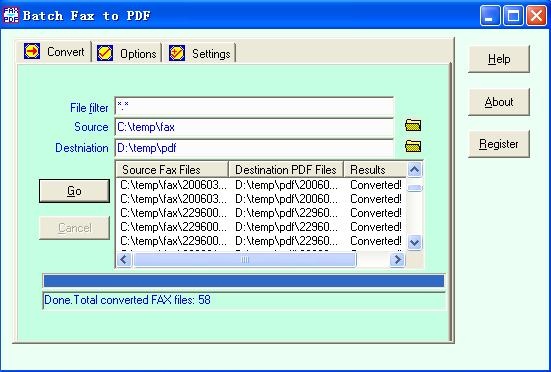
Batch Fax to PDF is a fax to pdf converter able to convert all group 3 group 4 compressed fax to pdf in batch, Such as:
1) Convert APRO MightyFax apf fax to pdf.
2) Convert MS awd fax to pdf.
3) Convert BitFax bfx fax to pdf.
4) Convert CALS Group IV (type I) cal cg4 mil ras img gp4 fax to pdf.
5) Convert black-white dcx bmp fax to pdf.
6) Convert Faxwizard fmf fax to pdf.
7) Convert Qulink Link qfx fax to pdf.
8) Convert Zetafax g3f g3n fax to pdf.
9) Convert black-white tif tiff files of Modified Huffman (MH), group 3 fax (MH MR or T.4), group 4 fax (MMR or T.6), PackBits compressed and uncompressed tiff to PDF.
10) Convert WinFax fxd fxm fxr fxs fax to pdf.
11) DIGI-FAX g3f fax to pdf.
12) Convert Image System ig4 fax to pdf.
13) Convert Kofax Ascent Capture DS fax to pdf.
14) Convert Xerox Edmics-mmr ED fax to pdf.
15) Convert all other group 3 group 4 compressed fax like g3 g4 mh mr mmr raw fax to pdf.
You can keep the converted pdf file date and time optionally.
Auto-convertion is supported by converting fax periodically.
Both GUI and command line modes are supported.
Create small pdf files and no need of Adobe Acrobat.
About Batch Fax to PDF
This Converters & Optimizers program is available in English. It was last updated on 29 September, 2026. Batch Fax to PDF is compatible with the following operating systems: Windows.
The company that develops Batch Fax to PDF is sfaxtools studio. The latest version released by its developer is 3.00.908. This version was rated by 4 users of our site and has an average rating of 3.0.
The download we have available for Batch Fax to PDF has a file size of N/A. Just click the green Download button above to start the downloading process. The program is listed on our website since 2009-08-16 and was downloaded 940 times. We have already checked if the download link is safe, however for your own protection we recommend that you scan the downloaded software with your antivirus. Your antivirus may detect the Batch Fax to PDF as malware if the download link is broken.
How to install Batch Fax to PDF on your Windows device:
- Click on the Download button on our website. This will start the download from the website of the developer.
- Once the Batch Fax to PDF is downloaded click on it to start the setup process (assuming you are on a desktop computer).
- When the installation is finished you should be able to see and run the program.
Program Details
System requirements
Download information
Pricing
Version History
version 3.00.908
posted on 2009-08-16
option to convert fax automatically
version 2.40
posted on 2007-05-08
able to convert B&W bitmap bmp, Xerox Edmics-mmr ED fax
